The wrong image size can cause awkward crops, soft text, hidden logos, or a
rejected product image. Each platform uses several image types, and displayed
size is not the same as a recommended upload or minimum requirement.
This guide covers profiles, banners, feeds, Stories, thumbnails, listings, and
marketplace main images for 18 platforms. Values are labeled recommended,
minimum, maximum, displayed size, or practical recommendation so
you can tell a hard rule from a reliable working canvas.
Last verified: July 12, 2026. Platforms change their layouts and upload
rules regularly, so check the linked official source before a high-value
campaign or a large catalog migration.
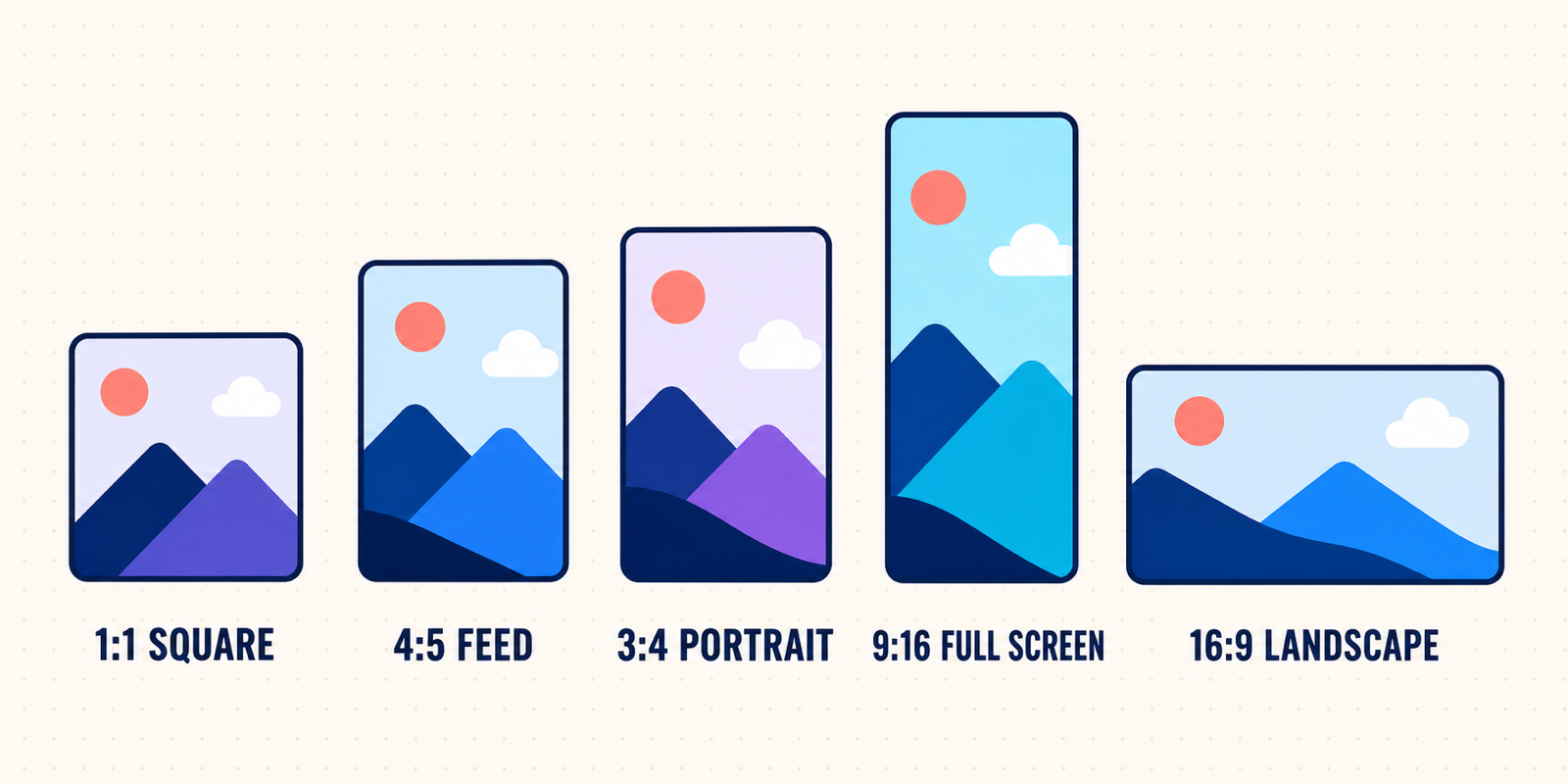
These four high-resolution canvases cover many common placements:
- 1080 × 1080 px (1:1): square feed posts, carousels, avatars, and product
images.
- 1080 × 1350 or 1080 × 1440 px (4:5 or 3:4): portrait feed posts that use
more mobile screen space. Instagram now preserves photos up to 3:4.
- 1080 × 1920 px (9:16): Stories, vertical image posts, covers, and
full-screen placements.
- 1920 × 1080 or 1200 × 628 px (16:9 or about 1.91:1): thumbnails, banners,
link cards, and landscape posts.
These are starting points, not universal requirements. Platform banners and
marketplace product images still need dedicated canvases.
Resize an image for any platform — enter an exact width and
height, then crop, expand, or scale the image without installing software.
Use this table for the most common placement on each platform. Jump to the
detailed section when you also need a profile image, cover, file limit, safe
area, or marketplace content rule.
| Platform | Asset | Recommended size | Aspect ratio | Key note |
|---|
| Instagram | Portrait feed photo | 1080 × 1440 px | 3:4 | Current supported portrait limit |
| Instagram | Story / Reel cover | 1080 × 1920 px | 9:16 | Keep key content away from UI |
| Facebook | Feed / link image | 1200 × 630 px | 1.91:1 | Practical cross-device canvas |
| Facebook | Story | 1080 × 1920 px | 9:16 | Practical recommendation |
| TikTok | Vertical photo post | 1080 × 1920 px | 9:16 | Practical organic-post canvas |
| YouTube | Video thumbnail | 1280 × 720 px | 16:9 | Official recommendation |
| YouTube | Channel banner | 2560 × 1440 px | 16:9 | Center text in the safe area |
| X | Standalone post image | 1200 × 1200 px | 1:1 | Official ad recommendation; useful organically |
| LinkedIn | Portrait post | 1080 × 1350 px | 4:5 | Practical canvas within official ratio range |
| Pinterest | Standard Pin | 1000 × 1500 px | 2:3 | Official recommendation |
| Snapchat | Story / full-screen image | 1080 × 1920 px | 9:16 | Preferred high-resolution canvas |
| Threads | Portrait post | 1080 × 1440 px | 3:4 | Practical recommendation |
| Bluesky | Single post image | 1200 × 675 px | 16:9 | Practical recommendation; compress below limit |
| Reddit | Community banner | 1080 × 128 px | 8.44:1 | Official mobile recommendation |
| Discord | Server banner | 960 × 540 px | 16:9 | Official recommendation |
| Amazon | Product image | 2000 × 2000 px | 1:1 | Practical canvas above zoom threshold |
| eBay | Listing image | 1600 × 1600 px | 1:1 | Official recommendation |
| Etsy | Listing image | 2000 × 2000 px | 1:1 | Official minimum recommendation |
| Shopify | Product image | 2048 × 2048 px | 1:1 | Practical theme-friendly canvas |
| Walmart | Product image | 2200 × 2200 px | 1:1 | Official recommendation |
| Google Merchant Center | Product image | 1500 × 1500 px | 1:1 | Official performance recommendation |
- Recommended size is the platform's preferred upload size for quality or
a specific placement.
- Minimum size is the smallest accepted image, not a promise of sharpness.
- Maximum size is a pixel, megapixel, or file-size limit that an upload
cannot exceed.
- Displayed size is how large an image appears in one interface.
- Practical recommendation is a dependable production canvas when the
platform publishes a ratio or upload limit but no single ideal pixel size.
Check ratio and pixels separately: 600 × 600 and 2000 × 2000 are both 1:1, but
only the larger file may provide marketplace zoom detail.
Instagram preserves photos up to 1080 pixels wide when the ratio is between
1.91:1 and 3:4, according to its current official help.
| Asset | Size | Status | Ratio / limit |
|---|
| Profile photo | 320 × 320 px | Practical recommendation | 1:1; displayed as a circle |
| Square feed photo | 1080 × 1080 px | Recommended working size | 1:1 |
| Portrait feed photo | 1080 × 1440 px | Recommended working size | 3:4 current portrait limit |
| Landscape feed photo | 1080 × 566 px | Recommended working size | About 1.91:1 |
| Story | 1080 × 1920 px | Practical recommendation | 9:16 |
| Reel cover | 1080 × 1920 px | Practical recommendation | 9:16; feed/grid previews crop it |
| Carousel | Match the first image | Recommended workflow | Keep every slide at one ratio |
Best choice: use 1080 × 1440 for a portrait post, or 1080 × 1350 when you
need a 4:5 canvas shared with other networks.
Crop and safe-area note: keep text, faces, and logos near the center of a
Story or Reel cover. Interface buttons and captions cover the top and bottom,
while profile-grid previews may use a different crop from the full post.
Source: Instagram Help — image resolution and supported ratios.
Profile, Story, and cover canvases are practical recommendations rather than
fixed organic-upload requirements.
Facebook uses circular identity images, responsive covers, feed media, link
previews, and Stories. Always preview covers across devices.
| Asset | Size | Status | Ratio / limit |
|---|
| Page profile picture | 320 × 320 px | Official best quality | 1:1; displayed at 176 × 176 desktop and 196 × 196 mobile |
| Page cover | 851 × 315 px | Official fast-loading export | Responsive; minimum 400 × 150 px |
| Page cover master | 1640 × 624 px | Practical high-density canvas | Mirrors 851:315 closely |
| Feed image | 1200 × 1500 px | Practical recommendation | 4:5 portrait |
| Link preview | 1200 × 630 px | Practical recommendation | About 1.91:1 |
| Story | 1080 × 1920 px | Practical recommendation | 9:16 |
Best choice: make 1200 × 1500 for portrait feeds and 1200 × 630 for links
and wide-card placements.
Crop and safe-area note: Facebook says the left side of a Page cover is
partly covered by the profile picture and the image may be cropped and resized.
Avoid placing a logo or headline against any edge. Use PNG for covers with text
or logos and an sRGB JPG for photographic covers.
Source: Facebook Help — Page profile and cover dimensions.
Feed, link, and Story pixels are practical production canvases because organic
display changes with placement and device.
TikTok is vertical-first, but photo posts and Carousel Ads can also be square or
landscape. Organic posts have no single official ideal pixel size.
| Asset | Size | Status | Ratio / limit |
|---|
| Profile photo | 400 × 400 px | Practical recommendation | 1:1; shown as a circle |
| Organic photo post | 1080 × 1920 px | Practical recommendation | 9:16 |
| Cover image | 1080 × 1920 px | Practical recommendation | 9:16; preview crops vary |
| Carousel Ad, vertical | 720 × 1280 px | Official resolution | 9:16 |
| Carousel Ad, square | 640 × 640 px | Official resolution | 1:1 |
| Carousel Ad, landscape | 1200 × 628 px | Official resolution | About 1.91:1 |
Standard Carousel accepts 2–35 JPG, JPEG, or PNG images and suggests files at or
below 100 KB. Treat that as an ad-delivery target, not a design-master size.
Best choice: create the master at 1080 × 1920, then keep important text and
the subject in the middle portion. Downsize a separate export only when Ads
Manager specifies 720 × 1280 or another placement size.
Crop and safe-area note: leave clear space at the top, bottom, and right side
for account information, captions, navigation, and engagement controls. Always
preview the asset in the publishing interface.
Source: TikTok for Business — Carousel Ad specifications.
YouTube needs separate files for its circular profile image, responsive banner,
16:9 thumbnail, and square watermark.
| Asset | Size | Status | Ratio / limit |
|---|
| Profile picture | 800 × 800 px | Practical upload size | 1:1; renders at 98 × 98 px; maximum 15 MB |
| Channel banner | 2560 × 1440 px | Official recommended | 16:9; maximum 6 MB |
| Banner upload minimum | 2048 × 1152 px | Official minimum | 16:9 |
| Safe area at minimum banner size | 1235 × 338 px | Official safe area | Center text and logos here |
| Video thumbnail | 1280 × 720 px | Official recommended | 16:9; minimum width 640 px; maximum 2 MB |
| Video watermark | 150 × 150 px or larger | Official minimum | Square; under 1 MB |
For standard video thumbnails, YouTube recommends 1280 × 720, requires a
minimum width of 640 px, and sets a 2 MB file-size limit.
Best choice: export video thumbnails at 1280 × 720. Use 2560 × 1440 for
channel art, but design every essential word and logo inside the central safe
area.
Crop and safe-area note: the same banner appears on TV, desktop, and mobile,
but each device reveals a different part of it. Treat the outer banner as
background-only space. Keep thumbnail text large enough to read when the image
is reduced to a small recommendation card.
Sources: YouTube Help — channel branding
and YouTube Help — custom thumbnails.
X supports 1:1, 1.91:1, 16:9, 4:5, 2:3, and 9:16 images. Choose the canvas for
the intended feed, card, or full-screen placement.
| Asset | Size | Status | Ratio / limit |
|---|
| Profile image | 400 × 400 px | Official recommended | 1:1; circular display |
| Header image | 1500 × 500 px | Official recommended | 3:1 |
| Standalone image | 1200 × 1200 px | Official ad recommendation | 1:1 |
| Standalone landscape image | 1200 × 628 px | Official ad recommendation | About 1.91:1 |
| Portrait image | 1440 × 1800 px | Official supported canvas | 4:5 |
| Website card | 800 × 418 px | Official ad recommendation | About 1.91:1 |
| Image file size | Up to 5 MB | Official ad maximum | PNG and JPEG recommended |
Best choice: use 1200 × 1200 for a flexible single-image post or 1440 ×
1800 when you deliberately want a taller mobile creative. Use 1500 × 500 only
for the profile header.
Crop and safe-area note: leave generous space around the header's subject
because responsive layouts and the profile image can cover or crop part of the
design. For card headlines, X advises keeping text away from the lower-left
area where interface elements can appear.
Sources: X Help — profile and header image sizes
and X Ads creative specifications.
LinkedIn's official post-photo range is 3:1 through 4:5, with a 552 × 276
minimum and a recommended width of 1080 pixels.
| Asset | Size | Status | Ratio / limit |
|---|
| Personal profile photo | 400 × 400 px | Practical recommendation | 1:1; circular display |
| Personal background photo | 1584 × 396 px | Practical recommendation | 4:1 |
| Company Page logo | 400 × 400 px | Practical recommendation | 1:1 |
| Company Page cover | 1128 × 191 px | Practical recommendation | About 5.9:1 |
| Single portrait post | 1080 × 1350 px | Practical recommendation | 4:5 official maximum portrait ratio |
| Square post | 1080 × 1080 px | Practical recommendation | 1:1 |
| Link preview | 1200 × 627 px | Official recommendation | 1.91:1; minimum width 200 px |
| Post image upload | 5 MB maximum | Official limit | 3:1 through 4:5 |
Best choice: use 1080 × 1350 for a standalone mobile-first post and 1200 ×
627 when the image accompanies a URL. A square 1080 × 1080 version remains a
useful shared asset for carousels and cross-posting.
Crop and safe-area note: the first image controls a multi-photo layout.
LinkedIn can center-crop unsupported ratios, while identity images may cover
part of a background.
Sources: LinkedIn Help — sharing photos and official ratio range
and LinkedIn Help — Page link preview images.
Profile and cover pixels are practical recommendations because LinkedIn's
public help emphasizes upload controls more than one universal display size.
Pinterest favors vertical discovery. Its recommended 2:3 Pin avoids excessive
height and feed truncation.
| Asset | Size | Status | Ratio / limit |
|---|
| Profile photo | 280 × 280 px | Practical recommendation | 1:1; circular display |
| Standard Pin | 1000 × 1500 px | Official recommended | 2:3 |
| Square Pin | 1000 × 1000 px | Practical recommendation | 1:1 |
| Carousel card | 1000 × 1500 px | Recommended working size | 2:3; keep cards consistent |
| Business profile cover | 1600 × 900 px | Practical high-resolution export | 16:9; official minimum 800 × 450 px |
| Board cover | 600 × 600 px | Practical recommendation | 1:1; interface crops may vary |
| Standard image ad | Up to 20 MB desktop | Official maximum | PNG or JPEG |
Best choice: choose 1000 × 1500 for standard Pins and design the first Pin
in a carousel as the strongest standalone image.
Crop and safe-area note: Pinterest warns that ratios taller than 2:3 may be
cut off in the feed. Keep the title and central product inside the upper and
middle areas rather than relying on content at the bottom edge.
Sources: Pinterest Business — creative best practices
and Pinterest Business Help — profile cover.
Snapchat is full-screen and vertical; Stories and ads need room for interface
overlays.
| Asset | Size | Status | Ratio / limit |
|---|
| Public Profile photo | 320 × 320 px | Practical recommendation | 1:1; move and scale in app |
| Public Profile cover | 1080 × 1920 px | Practical recommendation | 9:16; preview before saving |
| Story / Snap image | 1080 × 1920 px | Preferred working size | 9:16 |
| Single image ad | 720 × 1280 px | Official current requirement | 9:16 |
| Top Snap image | 1080 × 1920 px | Official API specification | 9:16; JPG/PNG; maximum 5 MB |
| Story Ad preview | 360 × 600 px minimum | Official minimum | 3:5; PNG; maximum 2 MB |
Best choice: create at 1080 × 1920, then provide a 720 × 1280 derivative if
the selected Ads Manager placement requests it.
Crop and safe-area note: do not place key content flush against the top or
bottom. Snapchat adds the brand name, headline, call to action, navigation, and
other controls over the full-screen creative.
Sources: Snap for Developers — media specifications
and Snapchat for Business — ad formats and specs.
Threads publishes no separate fixed-pixel guide for organic images. The values
below are practical recommendations, not upload rules.
| Asset | Size | Status | Ratio / limit |
|---|
| Profile photo | 320 × 320 px | Practical recommendation | 1:1; circular display |
| Square post | 1080 × 1080 px | Practical recommendation | 1:1 |
| Portrait post | 1080 × 1440 px | Practical recommendation | 3:4 |
| Landscape post | 1200 × 675 px | Practical recommendation | 16:9 |
| Tall vertical post | 1080 × 1920 px | Practical recommendation | 9:16; feed preview may constrain it |
Best choice: use 1080 × 1440 for a single portrait image and 1080 × 1080
for a mixed-platform carousel workflow.
Crop and safe-area note: preview multi-image posts because the feed layout
can frame a collection differently from a single image. Avoid building a
headline that depends on the extreme top or bottom of a tall image.
Source context: Threads does not currently provide a comprehensive organic
pixel specification. These working sizes follow Meta's current
Instagram supported ratio guidance
and are intentionally labeled practical recommendations.
Bluesky specifies file size and aspect-ratio metadata rather than one required
pixel dimension. Posts can contain four images with individual alt text.
| Asset | Size | Status | Ratio / limit |
|---|
| Avatar | 1000 × 1000 px | Practical recommendation | 1:1; circular display |
| Profile banner | 1500 × 500 px | Practical recommendation | 3:1 |
| Single post image | 1200 × 675 px | Practical recommendation | 16:9 |
| Square post image | 1200 × 1200 px | Practical recommendation | 1:1 |
| Portrait post image | 1200 × 1500 px | Practical recommendation | 4:5 |
| Post image file | Under 1,000,000 bytes | Official per-image limit | Up to four images per post |
Best choice: export a 1200-pixel-wide JPG and tune compression until it is
below the per-image limit. Use PNG only when sharp text or transparency makes
the larger file worthwhile.
Crop and safe-area note: provide accurate aspect-ratio metadata and alt text
when publishing through an API. Bluesky's official developer guide says it is
better to omit unknown aspect-ratio metadata than to guess.
Source: Bluesky developer documentation — image embeds.
Pixel canvases for avatars, banners, and posts are practical recommendations.
Reddit's community banner is unusually wide and shallow, so do not reuse a
normal social header.
| Asset | Size | Status | Ratio / limit |
|---|
| User avatar | 256 × 256 px | Practical recommendation | 1:1; circular display |
| Community icon | 256 × 256 px | Practical recommendation | 1:1 |
| Desktop community banner | 1072 × 128 px minimum | Official minimum | Very wide; responsive crop |
| Mobile community banner | 1080 × 128 px | Official recommended | About 8.44:1 |
| Landscape post image | 1920 × 1080 px | Practical recommendation | 16:9 |
| Square post image | 1080 × 1080 px | Practical recommendation | 1:1 |
Best choice: make a dedicated 1080 × 128 community banner with a centered
subject and a simple background. Use 1920 × 1080 or 1080 × 1080 for normal post
images depending on the content.
Crop and safe-area note: put the community name and identifying artwork in
the center of the banner. Side areas are the most likely to be lost or covered
as Reddit adapts the design to different viewport widths.
Source: Reddit Help — community banner guidelines.
Avatar, icon, and post sizes are practical recommendations.
Discord uses square icons, a short profile banner, and a 16:9 server banner.
Some options require Nitro or a server Boost level.
| Asset | Size | Status | Ratio / limit |
|---|
| User avatar | 512 × 512 px | Practical recommendation | 1:1; circular display |
| Server icon | 512 × 512 px | Practical recommendation | 1:1; circular display |
| Profile banner | 680 × 240 px minimum | Official minimum | About 17:6; PNG/JPG/GIF under 10 MB |
| Server banner | 960 × 540 px | Official recommended | 16:9; 1920 × 1080 also accepted and resized |
| Scheduled event cover | 800 × 320 px | Practical recommendation | 5:2 |
| Embed / shared image | 1200 × 630 px | Practical recommendation | About 1.91:1 |
Best choice: keep avatars and icons at 512 × 512, use at least 680 × 240 for
a profile banner, and create server artwork at 1920 × 1080 when the source can
support it.
Crop and safe-area note: Discord advises keeping the top 48 pixels of a
960 × 540 server banner visually simple so the server title stays readable.
Avoid small text in an avatar because the image is usually displayed as a tiny
circle.
Sources: Discord Support — custom profiles
and Discord Support — server banners.
Event and embed canvases are practical recommendations.
Marketplace compliance also depends on background, framing, watermarks, text,
props, and whether the photo accurately represents the item.
Amazon separates technical uploads from main-image content rules. Every product
needs an image, and larger images enable zoom.
| Asset / rule | Size or requirement | Status |
|---|
| Any product image | 500–10,000 px on the longest side | Official accepted range |
| Zoom-ready image | More than 1000 px on the longest side | Official preference |
| Production canvas | 2000 × 2000 px | Practical recommendation |
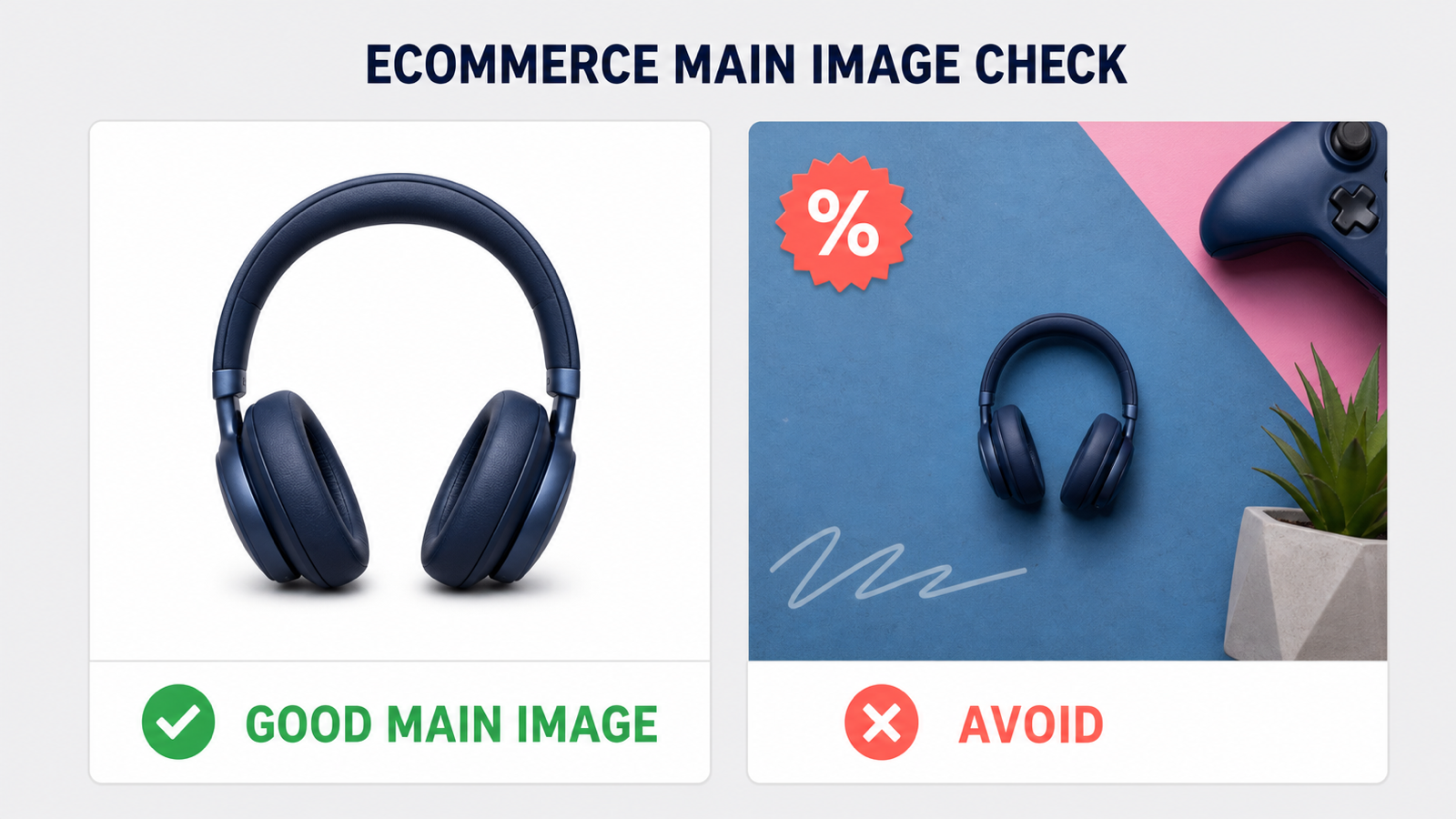
| Main image | Pure white background; only the product being sold | Official content rule |
| Additional images | 2000 × 2000 px | Practical recommendation |
| File formats | JPEG, TIFF, PNG, non-animated GIF | Official formats; JPEG preferred |
| Image count | At least 6 images plus 1 video | Official recommendation |
Best choice: prepare a 2000 × 2000 JPEG main image on pure white, centered
and filling most of the frame. Check category rules before adding graphics to
secondary images.
Compliance note: do not enlarge a small source merely to cross the zoom
threshold; interpolation cannot restore missing detail. Main-image rules can
also vary by category, bundle, packaging, or product type.
Source: Amazon Seller Central — current product image requirements.
eBay requires one image, allows up to 24, and recommends 1600 pixels rather
than merely meeting its 500-pixel minimum.
| Asset / rule | Size or requirement | Status |
|---|
| Listing image minimum | 500 × 500 px | Official minimum |
| Listing image recommendation | About 1600 × 1600 px | Official recommendation |
| Working ratios | 1:1 or 16:9 | Official best-looking ratios |
| File size | 12 MB per image | Official maximum |
| Image count | Up to 24 | Official maximum |
| Formats | JPEG, PNG, GIF, TIFF, BMP, WebP, HEIC, AVIF | Official accepted formats |
Best choice: export 1600 × 1600 images for the main shot and product detail
views. Photograph the whole item face-on for the first image, then use the
remaining images for angles, scale, condition, and flaws.
Compliance note: eBay prohibits borders, added marketing text, artwork, and
watermarks. Used, damaged, or defective products need photos of the actual item
rather than a stock image.
Source: eBay Help — adding pictures to listings
and eBay picture policy.
Etsy combines product photos with shop-branding formats and warns that
transparent PNG areas can appear black.
| Asset | Size | Status |
|---|
| Listing photo | At least 2000 × 2000 px | Official recommendation |
| First listing photo | At least 635 × 635 px | Official minimum to avoid search disadvantage |
| Shop logo | 500 × 500 px | Official recommended |
| Profile photo | 400 × 400 px | Official recommended |
| Mini shop banner | 1600 × 213 px | Official recommended; 1200 × 160 px minimum |
| Big shop banner | 1600 × 400 px | Official recommended; 1200 × 300 px minimum |
| Carousel banner | 1200 × 300 px | Official recommended |
Best choice: use at least 2000 × 2000 for product photos and set the first
listing photo's thumbnail deliberately. Use 1600 × 400 for a big banner and
keep branding centered so mobile cropping does not remove it.
Compliance note: Etsy supports JPG, GIF, PNG, SVG, and HEIC, but animated
GIFs and transparent PNGs are not supported as expected; transparency may
render black. Export a flattened JPG when a transparent background is not
essential.
Source: Etsy Help — requirements and best practices for shop images.
Shopify has no universal product-image ratio because themes control cards,
galleries, collections, and banners. Catalog consistency matters most.
| Asset | Size | Status |
|---|
| Product image | 2048 × 2048 px | Practical recommendation |
| Collection image | 2048 × 2048 px | Practical recommendation; match theme crop |
| Hero / theme banner | 2400 × 1200 px | Practical starting point; theme-dependent |
| Product / collection upper limit | Up to 5000 × 5000 px or 25 MP | Official maximum |
| Product / collection file size | Under 20 MB | Official maximum |
| General Files image | Up to 20 MP and 20 MB | Official general-file maximum |
| Formats | JPEG, PNG, WebP, HEIC, GIF | Official general image formats |
Best choice: use a consistent 2048 × 2048 canvas for square product
catalogs. For banners and collection cards, inspect the theme's documentation
and export for its actual section ratio instead of forcing a square image.
Performance note: the upload limit is not a target. Compress photos, retain
zoom detail, and let Shopify generate responsive derivatives. Use JPEG for
photos and PNG for sharp graphics or transparency.
Sources: Shopify Help — product media types
and Shopify Help — image and file requirements.
Walmart's current developer guidance recommends a square 2200 × 2200 JPG at
300 ppi. Its Marketplace content policy requires a seamless white main-image
background.
| Asset / rule | Size or requirement | Status |
|---|
| Product image | 2200 × 2200 px | Official recommendation |
| Aspect ratio | 1:1 square | Official recommendation |
| Resolution | 300 ppi | Official recommendation |
| Source format | Public JPG URL without redirects | Official recommendation |
| Main-image background | Seamless white, RGB 255/255/255 | Official content rule |
| Image count | At least two | Official content rule |
Best choice: deliver a 2200 × 2200 square JPG. Crop close enough that the
product is easy to inspect without cutting it off, then add distinct supporting
views.
Compliance note: the main image must not include watermarks, seller names,
logos, overlays, promotional text, or accessories not included with the item.
Additional images may show the product in an appropriate setting.
Sources: Walmart Developer — Item Management API overview
and Walmart Marketplace — Item Setup Content Policies (PDF).
Google Merchant Center can warn about images below its future 500 × 500 standard
from July 2026; enforcement begins January 31, 2027.
| Asset / rule | Size or requirement | Status |
|---|
| Main product image | 1500 × 1500 px or larger | Official performance recommendation |
| New universal minimum | 500 × 500 px | Official minimum from January 31, 2027 |
| Non-apparel minimum before that date | 100 × 100 px | Current official minimum |
| Apparel minimum before that date | 250 × 250 px | Current official minimum |
| YouTube Shopping on TV | 500 × 500 px | Official minimum |
| Resolution | 64 megapixels | Official maximum |
| File size | 16 MB | Official maximum |
| Product coverage | 75%–90% of the image | Official recommendation |
The main image uses the image_link attribute; additional views use
additional_image_link. Supported formats include JPEG, WebP, PNG, GIF, BMP,
and TIFF, and the URLs must be crawlable by Google.
Best choice: move every catalog to at least 1500 × 1500 now. That is safely
above the 2027 minimum and matches Google's current recommendation for strong
performance across listing formats.
Compliance note: show the correct product variant and avoid placeholders,
generic graphics, or a logo used instead of the product. Google recommends a
solid white or transparent background and says the product should occupy
between 75% and 90% of the frame.
Sources: Google Merchant Center — image link specification
and Google Merchant Center — upcoming 500 × 500 enforcement.
Start with one high-resolution master, protect essential content, and build a
small family of ratio variants.
Use the largest clean source available. A social master with at least 2400
pixels on the short side leaves room for varied crops. Preserve original
product photos and export marketplace copies.
Do not upscale a tiny file merely to meet a minimum; it cannot recreate missing
texture or detail. Inspect any enhanced result at 100%.
Build these versions from the master:
- 1:1 square: 1080 × 1080 for social or 2000 × 2000 and above for product
listings.
- 4:5 and 3:4 portrait: 1080 × 1350 for broad social compatibility and
1080 × 1440 for Instagram's current taller photo range.
- 9:16 vertical: 1080 × 1920 for Stories, Snapchat, TikTok, and covers.
- 16:9 landscape: 1920 × 1080 for wide social media and thumbnails.
- 1.91:1 link card: 1200 × 628 or 1200 × 630 for link-preview workflows.
Add platform-specific banners and marketplace exports only when needed.
- Use Crop when removing peripheral content is acceptable and the subject
should fill the new frame.
- Use Expand when you need a wider or taller canvas without cutting off the
subject. Fill the new area with a solid color, transparency, or AI-generated
surroundings as the destination platform allows.
- Use Scale when the ratio is correct and only the pixel size must change.
For a detailed walkthrough, read
How to Use AI Resize Image.
Keep faces, logos, prices, and text away from every edge. Follow official safe
areas exactly; otherwise, keep critical content within the central 70%–80% and
preview it in the platform composer.
- JPG/JPEG: compact default for photos and marketplace images; no
transparency.
- PNG: useful for logos, screenshots, graphics, and crisp text. Some
marketplaces flatten or reject its transparency.
- WebP: efficient and supported by Shopify and Google Merchant Center, but
not every upload form accepts it.
Export in sRGB unless a platform explicitly requests something else. Compress
the delivery copy rather than repeatedly saving over the original master.
Create every size from one source image with exact dimensions,
ratio controls, free local crop and scale, or AI-assisted expansion.
A 1080-pixel-wide image is a strong start: 1080 × 1080 square, 1080 × 1350 or
1080 × 1440 portrait, and 1080 × 1920 full-screen. One file will not display
identically everywhere.
Reuse the source design, not the same crop. Create a small ratio set and keep
the visual hierarchy consistent.
Yes, for square posts, carousels, avatars, and templates. Portrait feeds,
Stories, YouTube thumbnails, and ecommerce products need other canvases.
Use JPG for photos, PNG for graphics or transparency, and WebP only where it is
explicitly accepted. Keep a high-quality master for later formats.
Keep essential content near the center, use the platform's official safe area
when one exists, and preview the upload on both mobile and desktop. Avoid
placing a headline directly against an edge, behind a circular avatar, or under
the control-heavy lower portion of a Story.
There is no single universal requirement, but 2000 × 2000 is a useful master
for many square catalogs. Export the platform-specific version afterward:
Amazon prefers more than 1000 pixels on the longest side for zoom, eBay
recommends about 1600 × 1600, Etsy recommends at least 2000 × 2000, Walmart
specifies 2200 × 2200, and Google recommends 1500 × 1500 or larger.
No. A minimum is the lowest value that may be accepted. A recommended size is
intended to produce better display quality, zoom, or delivery performance. For
example, eBay's minimum is 500 × 500 while its recommendation is about 1600 × 1600. Design to the recommendation whenever the source image supports it.
Small display and crop changes can happen throughout the year, while formal
upload requirements change less often. Review official documentation before
major campaigns and catalog imports, and audit evergreen templates at least
quarterly. This guide uses a permanent URL and will update the year, verified
date, and specifications as platforms change.
The safest process is simple: preserve a high-resolution master, build the few
ratios your campaign actually needs, preview each destination, and export a
separate delivery file. That prevents accidental stretching, protects text
from interface overlays, and keeps marketplace images within both quality and
content rules.
Open the AI Resize Image editor to crop, expand, or scale an image to
any exact pixel size in this guide.

Social Media & Ecommerce Image Sizes: The Complete 2026 Guide
Table of Contents
The wrong image size can cause awkward crops, soft text, hidden logos, or a rejected product image. Each platform uses several image types, and displayed size is not the same as a recommended upload or minimum requirement.
This guide covers profiles, banners, feeds, Stories, thumbnails, listings, and marketplace main images for 18 platforms. Values are labeled recommended, minimum, maximum, displayed size, or practical recommendation so you can tell a hard rule from a reliable working canvas.
Last verified: July 12, 2026. Platforms change their layouts and upload rules regularly, so check the linked official source before a high-value campaign or a large catalog migration.
Quick Answer: The Four Canvases to Create First
These four high-resolution canvases cover many common placements:
These are starting points, not universal requirements. Platform banners and marketplace product images still need dedicated canvases.
Resize an image for any platform — enter an exact width and height, then crop, expand, or scale the image without installing software.
Quick Reference Table
Use this table for the most common placement on each platform. Jump to the detailed section when you also need a profile image, cover, file limit, safe area, or marketplace content rule.
How to Read Image Size Requirements
Check ratio and pixels separately: 600 × 600 and 2000 × 2000 are both 1:1, but only the larger file may provide marketplace zoom detail.
Social Media Image Sizes
Instagram Image Sizes
Instagram preserves photos up to 1080 pixels wide when the ratio is between 1.91:1 and 3:4, according to its current official help.
Best choice: use 1080 × 1440 for a portrait post, or 1080 × 1350 when you need a 4:5 canvas shared with other networks.
Crop and safe-area note: keep text, faces, and logos near the center of a Story or Reel cover. Interface buttons and captions cover the top and bottom, while profile-grid previews may use a different crop from the full post.
Source: Instagram Help — image resolution and supported ratios. Profile, Story, and cover canvases are practical recommendations rather than fixed organic-upload requirements.
Facebook Image Sizes
Facebook uses circular identity images, responsive covers, feed media, link previews, and Stories. Always preview covers across devices.
Best choice: make 1200 × 1500 for portrait feeds and 1200 × 630 for links and wide-card placements.
Crop and safe-area note: Facebook says the left side of a Page cover is partly covered by the profile picture and the image may be cropped and resized. Avoid placing a logo or headline against any edge. Use PNG for covers with text or logos and an sRGB JPG for photographic covers.
Source: Facebook Help — Page profile and cover dimensions. Feed, link, and Story pixels are practical production canvases because organic display changes with placement and device.
TikTok Image Sizes
TikTok is vertical-first, but photo posts and Carousel Ads can also be square or landscape. Organic posts have no single official ideal pixel size.
Standard Carousel accepts 2–35 JPG, JPEG, or PNG images and suggests files at or below 100 KB. Treat that as an ad-delivery target, not a design-master size.
Best choice: create the master at 1080 × 1920, then keep important text and the subject in the middle portion. Downsize a separate export only when Ads Manager specifies 720 × 1280 or another placement size.
Crop and safe-area note: leave clear space at the top, bottom, and right side for account information, captions, navigation, and engagement controls. Always preview the asset in the publishing interface.
Source: TikTok for Business — Carousel Ad specifications.
YouTube Image Sizes
YouTube needs separate files for its circular profile image, responsive banner, 16:9 thumbnail, and square watermark.
For standard video thumbnails, YouTube recommends 1280 × 720, requires a minimum width of 640 px, and sets a 2 MB file-size limit.
Best choice: export video thumbnails at 1280 × 720. Use 2560 × 1440 for channel art, but design every essential word and logo inside the central safe area.
Crop and safe-area note: the same banner appears on TV, desktop, and mobile, but each device reveals a different part of it. Treat the outer banner as background-only space. Keep thumbnail text large enough to read when the image is reduced to a small recommendation card.
Sources: YouTube Help — channel branding and YouTube Help — custom thumbnails.
X Image Sizes
X supports 1:1, 1.91:1, 16:9, 4:5, 2:3, and 9:16 images. Choose the canvas for the intended feed, card, or full-screen placement.
Best choice: use 1200 × 1200 for a flexible single-image post or 1440 × 1800 when you deliberately want a taller mobile creative. Use 1500 × 500 only for the profile header.
Crop and safe-area note: leave generous space around the header's subject because responsive layouts and the profile image can cover or crop part of the design. For card headlines, X advises keeping text away from the lower-left area where interface elements can appear.
Sources: X Help — profile and header image sizes and X Ads creative specifications.
LinkedIn Image Sizes
LinkedIn's official post-photo range is 3:1 through 4:5, with a 552 × 276 minimum and a recommended width of 1080 pixels.
Best choice: use 1080 × 1350 for a standalone mobile-first post and 1200 × 627 when the image accompanies a URL. A square 1080 × 1080 version remains a useful shared asset for carousels and cross-posting.
Crop and safe-area note: the first image controls a multi-photo layout. LinkedIn can center-crop unsupported ratios, while identity images may cover part of a background.
Sources: LinkedIn Help — sharing photos and official ratio range and LinkedIn Help — Page link preview images. Profile and cover pixels are practical recommendations because LinkedIn's public help emphasizes upload controls more than one universal display size.
Pinterest Image Sizes
Pinterest favors vertical discovery. Its recommended 2:3 Pin avoids excessive height and feed truncation.
Best choice: choose 1000 × 1500 for standard Pins and design the first Pin in a carousel as the strongest standalone image.
Crop and safe-area note: Pinterest warns that ratios taller than 2:3 may be cut off in the feed. Keep the title and central product inside the upper and middle areas rather than relying on content at the bottom edge.
Sources: Pinterest Business — creative best practices and Pinterest Business Help — profile cover.
Snapchat Image Sizes
Snapchat is full-screen and vertical; Stories and ads need room for interface overlays.
Best choice: create at 1080 × 1920, then provide a 720 × 1280 derivative if the selected Ads Manager placement requests it.
Crop and safe-area note: do not place key content flush against the top or bottom. Snapchat adds the brand name, headline, call to action, navigation, and other controls over the full-screen creative.
Sources: Snap for Developers — media specifications and Snapchat for Business — ad formats and specs.
Threads Image Sizes
Threads publishes no separate fixed-pixel guide for organic images. The values below are practical recommendations, not upload rules.
Best choice: use 1080 × 1440 for a single portrait image and 1080 × 1080 for a mixed-platform carousel workflow.
Crop and safe-area note: preview multi-image posts because the feed layout can frame a collection differently from a single image. Avoid building a headline that depends on the extreme top or bottom of a tall image.
Source context: Threads does not currently provide a comprehensive organic pixel specification. These working sizes follow Meta's current Instagram supported ratio guidance and are intentionally labeled practical recommendations.
Bluesky Image Sizes
Bluesky specifies file size and aspect-ratio metadata rather than one required pixel dimension. Posts can contain four images with individual alt text.
Best choice: export a 1200-pixel-wide JPG and tune compression until it is below the per-image limit. Use PNG only when sharp text or transparency makes the larger file worthwhile.
Crop and safe-area note: provide accurate aspect-ratio metadata and alt text when publishing through an API. Bluesky's official developer guide says it is better to omit unknown aspect-ratio metadata than to guess.
Source: Bluesky developer documentation — image embeds. Pixel canvases for avatars, banners, and posts are practical recommendations.
Reddit Image Sizes
Reddit's community banner is unusually wide and shallow, so do not reuse a normal social header.
Best choice: make a dedicated 1080 × 128 community banner with a centered subject and a simple background. Use 1920 × 1080 or 1080 × 1080 for normal post images depending on the content.
Crop and safe-area note: put the community name and identifying artwork in the center of the banner. Side areas are the most likely to be lost or covered as Reddit adapts the design to different viewport widths.
Source: Reddit Help — community banner guidelines. Avatar, icon, and post sizes are practical recommendations.
Discord Image Sizes
Discord uses square icons, a short profile banner, and a 16:9 server banner. Some options require Nitro or a server Boost level.
Best choice: keep avatars and icons at 512 × 512, use at least 680 × 240 for a profile banner, and create server artwork at 1920 × 1080 when the source can support it.
Crop and safe-area note: Discord advises keeping the top 48 pixels of a 960 × 540 server banner visually simple so the server title stays readable. Avoid small text in an avatar because the image is usually displayed as a tiny circle.
Sources: Discord Support — custom profiles and Discord Support — server banners. Event and embed canvases are practical recommendations.
Ecommerce Product Image Sizes
Marketplace compliance also depends on background, framing, watermarks, text, props, and whether the photo accurately represents the item.
Amazon Product Image Sizes
Amazon separates technical uploads from main-image content rules. Every product needs an image, and larger images enable zoom.
Best choice: prepare a 2000 × 2000 JPEG main image on pure white, centered and filling most of the frame. Check category rules before adding graphics to secondary images.
Compliance note: do not enlarge a small source merely to cross the zoom threshold; interpolation cannot restore missing detail. Main-image rules can also vary by category, bundle, packaging, or product type.
Source: Amazon Seller Central — current product image requirements.
eBay Product Image Sizes
eBay requires one image, allows up to 24, and recommends 1600 pixels rather than merely meeting its 500-pixel minimum.
Best choice: export 1600 × 1600 images for the main shot and product detail views. Photograph the whole item face-on for the first image, then use the remaining images for angles, scale, condition, and flaws.
Compliance note: eBay prohibits borders, added marketing text, artwork, and watermarks. Used, damaged, or defective products need photos of the actual item rather than a stock image.
Source: eBay Help — adding pictures to listings and eBay picture policy.
Etsy Image Sizes
Etsy combines product photos with shop-branding formats and warns that transparent PNG areas can appear black.
Best choice: use at least 2000 × 2000 for product photos and set the first listing photo's thumbnail deliberately. Use 1600 × 400 for a big banner and keep branding centered so mobile cropping does not remove it.
Compliance note: Etsy supports JPG, GIF, PNG, SVG, and HEIC, but animated GIFs and transparent PNGs are not supported as expected; transparency may render black. Export a flattened JPG when a transparent background is not essential.
Source: Etsy Help — requirements and best practices for shop images.
Shopify Image Sizes
Shopify has no universal product-image ratio because themes control cards, galleries, collections, and banners. Catalog consistency matters most.
Best choice: use a consistent 2048 × 2048 canvas for square product catalogs. For banners and collection cards, inspect the theme's documentation and export for its actual section ratio instead of forcing a square image.
Performance note: the upload limit is not a target. Compress photos, retain zoom detail, and let Shopify generate responsive derivatives. Use JPEG for photos and PNG for sharp graphics or transparency.
Sources: Shopify Help — product media types and Shopify Help — image and file requirements.
Walmart Marketplace Image Sizes
Walmart's current developer guidance recommends a square 2200 × 2200 JPG at 300 ppi. Its Marketplace content policy requires a seamless white main-image background.
Best choice: deliver a 2200 × 2200 square JPG. Crop close enough that the product is easy to inspect without cutting it off, then add distinct supporting views.
Compliance note: the main image must not include watermarks, seller names, logos, overlays, promotional text, or accessories not included with the item. Additional images may show the product in an appropriate setting.
Sources: Walmart Developer — Item Management API overview and Walmart Marketplace — Item Setup Content Policies (PDF).
Google Merchant Center Image Sizes
Google Merchant Center can warn about images below its future 500 × 500 standard from July 2026; enforcement begins January 31, 2027.
The main image uses the
image_linkattribute; additional views useadditional_image_link. Supported formats include JPEG, WebP, PNG, GIF, BMP, and TIFF, and the URLs must be crawlable by Google.Best choice: move every catalog to at least 1500 × 1500 now. That is safely above the 2027 minimum and matches Google's current recommendation for strong performance across listing formats.
Compliance note: show the correct product variant and avoid placeholders, generic graphics, or a logo used instead of the product. Google recommends a solid white or transparent background and says the product should occupy between 75% and 90% of the frame.
Sources: Google Merchant Center — image link specification and Google Merchant Center — upcoming 500 × 500 enforcement.
How to Resize One Image for Every Platform
Start with one high-resolution master, protect essential content, and build a small family of ratio variants.
1. Start With a Large Master
Use the largest clean source available. A social master with at least 2400 pixels on the short side leaves room for varied crops. Preserve original product photos and export marketplace copies.
Do not upscale a tiny file merely to meet a minimum; it cannot recreate missing texture or detail. Inspect any enhanced result at 100%.
2. Create a Small Ratio Set
Build these versions from the master:
Add platform-specific banners and marketplace exports only when needed.
3. Choose Crop, Expand, or Scale
For a detailed walkthrough, read How to Use AI Resize Image.
4. Protect the Safe Area
Keep faces, logos, prices, and text away from every edge. Follow official safe areas exactly; otherwise, keep critical content within the central 70%–80% and preview it in the platform composer.
5. Export the Right Format
Export in sRGB unless a platform explicitly requests something else. Compress the delivery copy rather than repeatedly saving over the original master.
Create every size from one source image with exact dimensions, ratio controls, free local crop and scale, or AI-assisted expansion.
Frequently Asked Questions
What image size works on most social media platforms?
A 1080-pixel-wide image is a strong start: 1080 × 1080 square, 1080 × 1350 or 1080 × 1440 portrait, and 1080 × 1920 full-screen. One file will not display identically everywhere.
Can I use the same image on every platform?
Reuse the source design, not the same crop. Create a small ratio set and keep the visual hierarchy consistent.
Is 1080 × 1080 still a good default?
Yes, for square posts, carousels, avatars, and templates. Portrait feeds, Stories, YouTube thumbnails, and ecommerce products need other canvases.
Should I use JPG, PNG, or WebP?
Use JPG for photos, PNG for graphics or transparency, and WebP only where it is explicitly accepted. Keep a high-quality master for later formats.
How do I prevent text and logos from being cropped?
Keep essential content near the center, use the platform's official safe area when one exists, and preview the upload on both mobile and desktop. Avoid placing a headline directly against an edge, behind a circular avatar, or under the control-heavy lower portion of a Story.
What is the best size for ecommerce product images?
There is no single universal requirement, but 2000 × 2000 is a useful master for many square catalogs. Export the platform-specific version afterward: Amazon prefers more than 1000 pixels on the longest side for zoom, eBay recommends about 1600 × 1600, Etsy recommends at least 2000 × 2000, Walmart specifies 2200 × 2200, and Google recommends 1500 × 1500 or larger.
Are minimum dimensions the same as recommended dimensions?
No. A minimum is the lowest value that may be accepted. A recommended size is intended to produce better display quality, zoom, or delivery performance. For example, eBay's minimum is 500 × 500 while its recommendation is about 1600 × 1600. Design to the recommendation whenever the source image supports it.
How often do platform image requirements change?
Small display and crop changes can happen throughout the year, while formal upload requirements change less often. Review official documentation before major campaigns and catalog imports, and audit evergreen templates at least quarterly. This guide uses a permanent URL and will update the year, verified date, and specifications as platforms change.
Make Every Platform Version From One Image
The safest process is simple: preserve a high-resolution master, build the few ratios your campaign actually needs, preview each destination, and export a separate delivery file. That prevents accidental stretching, protects text from interface overlays, and keeps marketplace images within both quality and content rules.
Open the AI Resize Image editor to crop, expand, or scale an image to any exact pixel size in this guide.